

简介
Effective 1 January 2027, every tax agent appointment must be authorised online by the taxpayer through the MyTax Portal. Pursuant to section 152A of the Income Tax Act 1967 (ITA 1967), a tax agent may act for a taxpayer only under an appointment recorded in MyTax. Manual Form CP55s, letters of authority and blanket e-Borang registrations are no longer recognised.
The requirement was introduced by Budget 2026 through amendments to subsections 152A(3) and 152A(3A) of the ITA 1967, together with a new subsection 152A(3B). Corresponding amendments apply to:
- subsections 57A(3) and 57A(3A) of the Real Property Gains Tax Act 1976;
- subsections 82A(3) and 82A(3A) of the Petroleum (Income Tax) Act 1967; and
- section 21C of the Labuan Business Activity Tax Act 1990.
The requirement applies to every taxpayer who engages a tax agent to deal with the Inland Revenue Board of Malaysia (HASiL), including individuals, companies, partnerships, estates and other entities. The manual Form CP55, previously signed by the taxpayer and kept by the tax agent, is replaced by a new Form CP55 submitted electronically in MyTax.
What It Means
- Online authorisation only. A tax agent, and the employees of the agent’s firm, may act for a taxpayer only under an appointment authorised in MyTax using the new Form CP55.
- Authorised by the taxpayer. The appointment must be made by the taxpayer. For a non-individual, it must be made by the person holding the relevant MyTax role, such as Director, Organisation Administrator or estate administrator. A tax agent cannot authorise its own appointment.
- Scope of authority. The appointed agent and firm may submit prescribed forms electronically and handle audits, investigations, appeals and other tax matters with HASiL on the taxpayer’s behalf. The taxpayer decides which MyTax information the agent may view or update.
- Up to two tax agents. A taxpayer may appoint up to two tax agents, for example one for corporate income tax and one for employer matters. Both agents receive the same system access, so the division of work should be agreed between the parties.
- Correspondence address. A taxpayer may elect one appointed firm’s address as the official correspondence address. Only the taxpayer can make this election in MyTax.
- Reassignment within the firm. If the taxpayer consents in the CP55, the firm may reassign the appointment to another licensed tax agent in the same firm when the appointed agent leaves.
Timeline Table
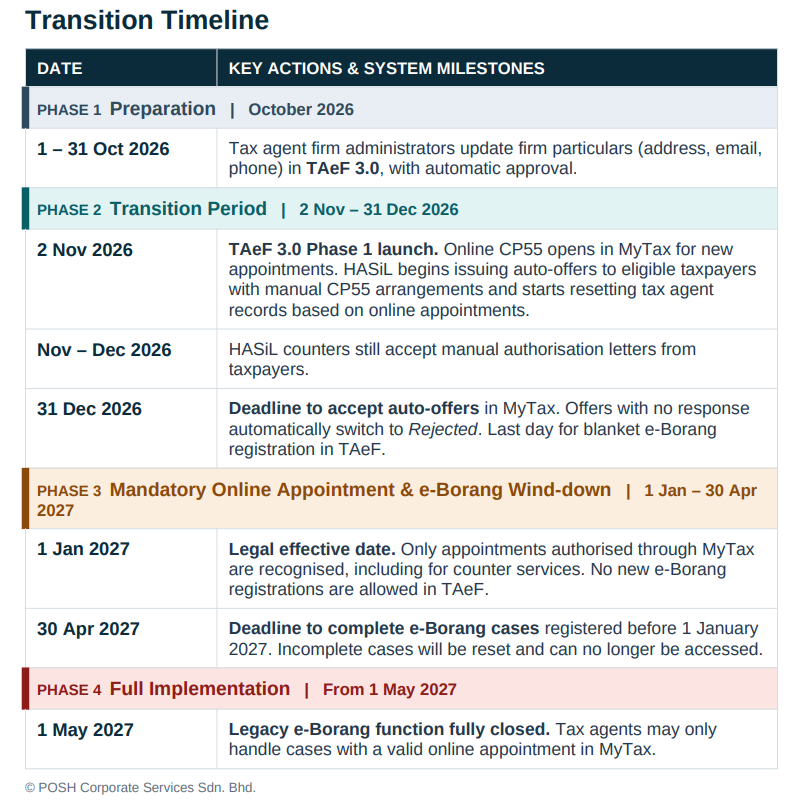
The move to mandatory online appointment was rolled out in four phases, from tax agent firm preparation in October 2026 to the full closure of the legacy e-Borang function on 1 May 2027.
Transition Period
- Auto-offer for existing clients. From 2 November 2026, HASiL issues a one-time online appointment offer to taxpayers with existing manual CP55 arrangements. A taxpayer qualifies if the tax agent submitted at least one return or form on the taxpayer’s behalf in the 12 months before 30 September 2026, such as BNCP, CKM, CKHT, Form E, CP22, SPC, CP204, CP204A or CP204B. Other conditions include an active taxpayer file and a valid tax agent licence. Offers are notified by email and displayed in MyTax.
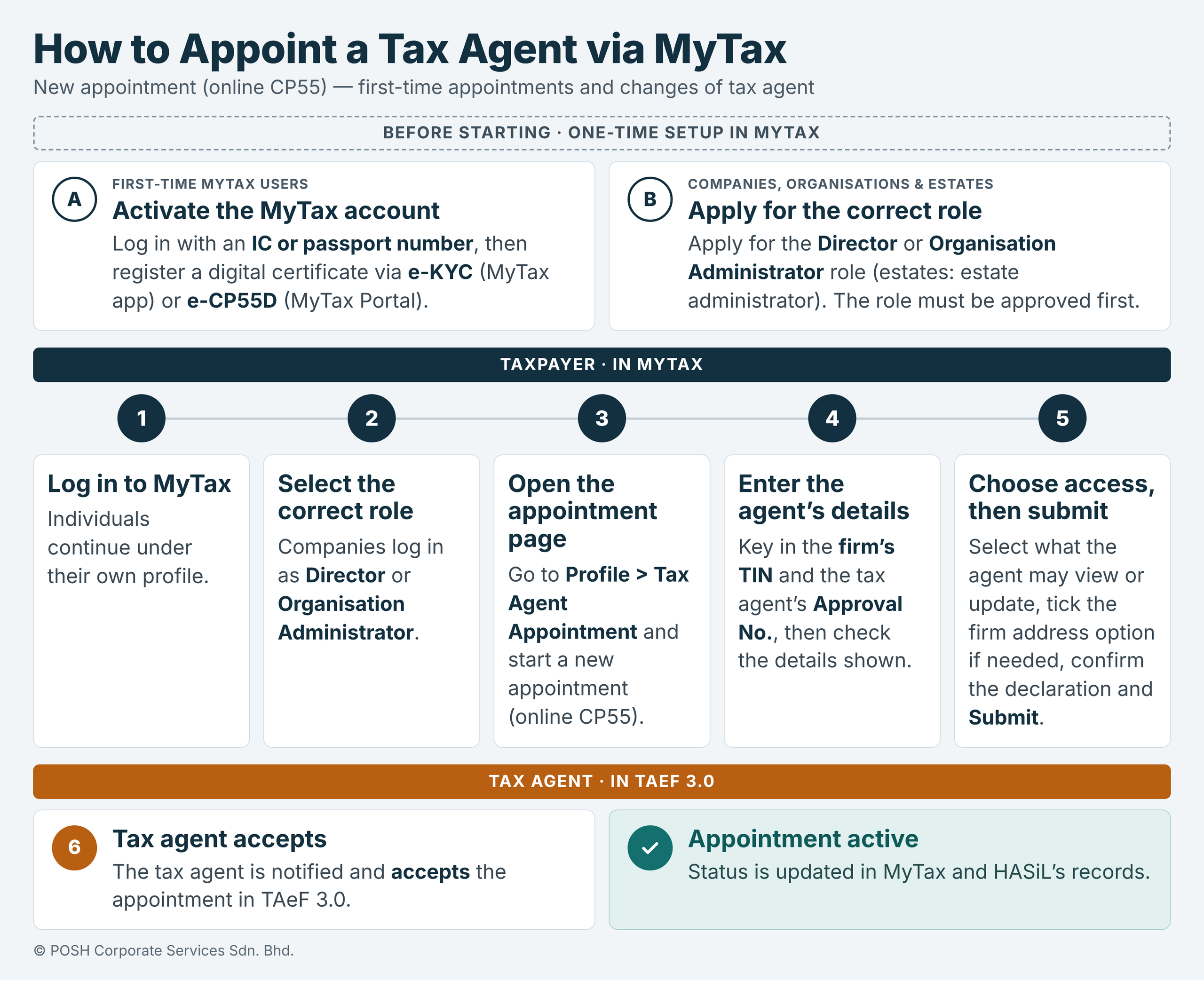
- Responding to an offer. The taxpayer logs in to MyTax, selects the correct role and goes to Profile > 税务服务 Agent Appointment. After clicking Action on the listed offer, the taxpayer confirms the access permissions and the correspondence address option, then selects Accept or Reject.
- Response deadline. Offers must be accepted by 31 December 2026. Any offer without a response by then is treated as Rejected, and the taxpayer must make a new appointment in MyTax.
- Record reset. From 2 November 2026, tax agent details in HASiL’s records are reset and rebuilt from appointments made through MyTax and TAeF.
- Closure of e-Borang registration. Blanket e-Borang registration in TAeF remains open until 31 December 2026. Cases registered before then must be completed by 30 April 2027, after which incomplete cases are reset and can no longer be accessed.
- Counter services. HASiL counters accept manual authorisation letters until 31 December 2026. From 1 January 2027, counter services and consultations rely solely on appointment records in MyTax.
Appointment Steps [New Appointment]
A new appointment is made when a taxpayer appoints a tax agent for the first time or changes tax agent.
Benefits to Taxpayer
- Confidentiality and access control. Taxpayers decide which MyTax modules and functions an agent can access, and can change this at any time, in line with section 138 of the ITA 1967.
- Flexibility. Tax responsibilities can be divided between up to two specialised tax agents.
- Simpler correspondence. Electing the tax firm’s address as the official correspondence address sends HASiL notices directly to the agent.
- Uninterrupted service. With the taxpayer’s consent, a firm can reassign the appointment to another licensed agent in the same firm if the appointed agent leaves, without restarting the authorisation.
- Real-time visibility. The MyTax dashboard shows filing status, ledger movements, notices and pending representations.
Call to Action
- Check your MyTax access: Confirm that the MyTax account is active. For companies and organisations, confirm that the Director or Organisation Administrator role is held by a current officer.
- Confirm the appointment is recorded. Check under Profile -> Tax Agent Appointment that each tax agent engaged is listed. An agent not shown there cannot act for the taxpayer, even with a signed letter.
- Make new appointments online: Appoint any new or replacement tax agent through MyTax, following the steps above.
- Keep appointments up to date: Review appointed agents and their access periodically, and cancel an appointment promptly when an agent or firm is no longer engaged. Keep the registered email address current, as HASiL sends appointment notifications there.
Frequently asked question
- Can a tax agent log into MyTax and complete the CP55 digital authorization on behalf of the taxpayer?
No. Authorization must be performed directly by the taxpayer or an authorized company representative holding an approved MyTax role (Director / Organization Administrator). Self-authorization by agents is strictly prohibited. - What happens if a taxpayer did not accept the HASiL Auto-Offer by 31 December 2026?
The offer will automatically be treated as Rejected and the manual CP55 is no longer recognised. To continue with the same tax agent, the taxpayer must make a new appointment in MyTax (see Appointment Steps above). - Can a company appoint separate tax agents for corporate income tax and employer filings?
Yes. A taxpayer may appoint up to two tax agents. Both receive the same system access, so the division of work should be agreed in writing. - Will manual CP55 forms or physical letters be accepted at HASiL service counters after 1 January 2027?
No. Physical forms and manual letters will no longer be accepted for filing or counter representation starting 1 January 2027; all authorizations must be reflected digitally in MyTax.
How can POSH help?
POSH Corporate is a licensed tax agent, chartered accountancy and company secretarial practice based in Petaling Jaya. We act for individuals, partnerships and companies across tax, accounting and corporate matters, including their dealings with HASiL.
Changes like this often raise wider questions about how your tax affairs are managed. Whether you are appointing a tax agent for the first time, reviewing your current arrangement, or simply want clarity on how these changes affect you, it helps to have the right support in place before the new requirements take effect.
To discuss your position or any tax matter in confidence, contact our tax team.